
 WooCommerce integration
Confirm WooCommerce cash-on-delivery orders and update their status automatically
Certifone connects to WooCommerce through its built-in REST API, so there is no plugin to install. New orders arrive the moment they are placed, customers confirm them over WhatsApp, a voice call or SMS, and your team's decisions change the real order status in WooCommerce.
Connection: Approve from your WordPress admin (WooCommerce REST API), or paste a Read/Write API key
How to connect WooCommerce
- 1
In the Certifone dashboard, choose WooCommerce.
- 2
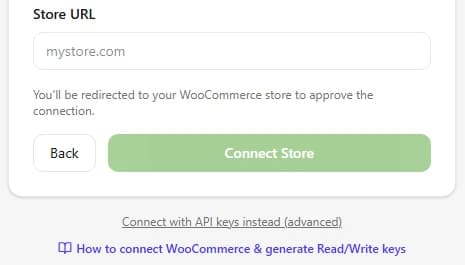
Enter your store URL (for example mystore.com) and click Connect Store.
- 3
You are taken to your WordPress admin. Approve the connection with Read/Write access.
- 4
Certifone registers the order webhooks on your store, and new orders start arriving straight away.
From WooCommerce to Certifone
- New and updated orders, delivered instantly by WooCommerce webhooks (order.created and order.updated).
- Every webhook is checked against its HMAC signature before it is accepted.
- Your product catalogue, when you sync it from Settings → Integrations.
From Certifone back to WooCommerce
- When your team confirms, holds or rejects an order from the Certifone dashboard, the WooCommerce order status changes (processing, on-hold or cancelled by default; you can map your own) and a private order note records the change.
- When you approve a customer's address correction, the shipping address on the order is updated.
- When a customer accepts an upsell offer, the extra item is added to the same WooCommerce order.
What happens to every order
- 01The order reaches Certifone the moment it is placed.
- 02Certifone scores its risk from the customer's history, address and phone number.
- 03The customer is asked to confirm on WhatsApp first, then by an automated voice call, then by SMS. You choose the order and timing.
- 04Confirmed orders move on to shipping; fake and refused orders are stopped before they cost you a courier fee.
Good to know
- No plugin needed. Certifone uses the WooCommerce REST API that ships with WooCommerce.
- Some hosts strip the Authorization header from API calls. Certifone detects this and retries in a way those hosts accept.
- Reconnecting reuses the webhooks already on your store instead of creating duplicates, and disconnecting removes them.
Frequently asked questions
Do I need to install a WordPress plugin?
No. Certifone uses the REST API built into WooCommerce. You either approve the connection from your WordPress admin or paste a Read/Write key.
Where do I create a WooCommerce API key?
In WordPress go to WooCommerce → Settings → Advanced → REST API, add a key with Read/Write permission, then paste the consumer key (ck_…) and consumer secret (cs_…) under “Connect with API keys instead”.
Which order statuses does Certifone set?
By default processing for confirmed, on-hold for pending and cancelled for rejected orders. You can map each decision to the status your store uses.
What happens if I disconnect?
Certifone removes the webhooks it registered on your store, so no more orders are sent.
Other integrations
 Shopify
 Salla
Salla EasyOrders
 Odoo
OdooStart confirming your WooCommerce orders
Free trial, no setup fee. You pay 1 EGP per confirmed order.
Start free trial