
 Odoo integration
Confirm Odoo cash-on-delivery sales orders over WhatsApp and calls
Certifone connects to Odoo with a standard Automated Action, so no module has to be installed. Each new sales order is posted to Certifone, where the customer confirms it over WhatsApp, a voice call or SMS.
Connection: Webhook from an Odoo Automated Action, secured with a secret token
How to connect Odoo
- 1
In the Certifone dashboard, choose Odoo and click Continue with Odoo. Certifone shows your webhook URL and a secret token.
- 2
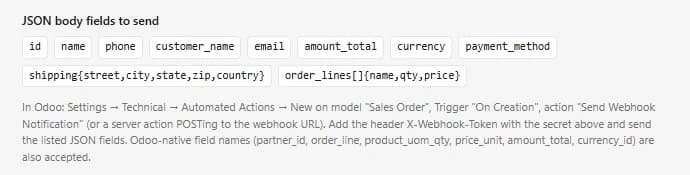
In Odoo go to Settings → Technical → Automated Actions and create a new action on the Sales Order model with the trigger On Creation.
- 3
Set the action to Send Webhook Notification (or a server action that POSTs) to your Certifone webhook URL, with the header X-Webhook-Token set to your secret.
- 4
Send the order fields shown in Certifone, then click “I've set up the webhook — continue”.
From Odoo to Certifone
- Every new sales order, posted by your Automated Action when it is created.
- Each request must carry your store's secret token, which is checked before the order is accepted.
- Fields: id, name, phone, customer_name, email, amount_total, currency, payment_method, the shipping address and order lines. Odoo's native field names (partner_id, order_line, product_uom_qty, price_unit, currency_id) are also accepted.
From Certifone back to Odoo
- Nothing is written back to Odoo yet. Confirmations and cancellations are managed in the Certifone dashboard.
What happens to every order
- 01The order reaches Certifone the moment it is placed.
- 02Certifone scores its risk from the customer's history, address and phone number.
- 03The customer is asked to confirm on WhatsApp first, then by an automated voice call, then by SMS. You choose the order and timing.
- 04Confirmed orders move on to shipping; fake and refused orders are stopped before they cost you a courier fee.
Frequently asked questions
Do I need to install an Odoo module?
No. The connection uses an Automated Action, which is built into Odoo.
Is the webhook secure?
Each store gets its own webhook URL and secret token, and Certifone rejects any request without the correct X-Webhook-Token header.
Does Certifone update the sales order in Odoo?
Not yet. Orders flow from Odoo into Certifone, and you manage confirmations and cancellations in the Certifone dashboard.
Other integrations
 Shopify
 WooCommerce
 Salla
Salla EasyOrders
Start confirming your Odoo orders
Free trial, no setup fee. You pay 1 EGP per confirmed order.
Start free trial