
 Shopify integration
Confirm every Shopify cash-on-delivery order before it ships
Certifone connects to your Shopify store with Shopify's own approval screen. Every new order reaches Certifone instantly, the customer confirms it on WhatsApp, a voice call or SMS, and the decision your team makes is written back to the order as a tag.
Connection: One-click approval on Shopify (OAuth), or a custom-app access token
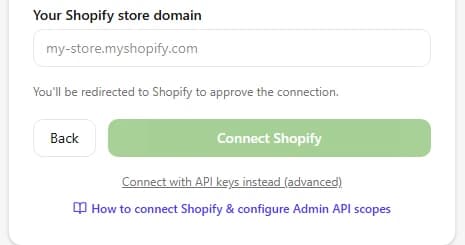
How to connect Shopify
- 1
In the Certifone dashboard, choose Shopify.
- 2
Enter your store's myshopify.com address (for example my-store.myshopify.com) and click Connect Shopify.
- 3
Shopify opens its approval screen. Approve access to orders, customers and products.
- 4
You return to Certifone connected. Order webhooks are registered for you, so new orders start arriving straight away.
From Shopify to Certifone
- New and updated orders, delivered instantly by Shopify webhooks (orders/create and orders/updated).
- Every webhook is checked against Shopify's HMAC signature before it is accepted.
- Your product catalogue, when you sync it from Settings → Integrations.
From Certifone back to Shopify
- When your team confirms, holds or rejects an order from the Certifone dashboard, the order is tagged in Shopify (confirmed, pending or cancelled by default; you can rename them). Your existing tags are kept.
- When you approve a customer's address correction, the shipping address on the Shopify order is updated and a note is added.
What happens to every order
- 01The order reaches Certifone the moment it is placed.
- 02Certifone scores its risk from the customer's history, address and phone number.
- 03The customer is asked to confirm on WhatsApp first, then by an automated voice call, then by SMS. You choose the order and timing.
- 04Confirmed orders move on to shipping; fake and refused orders are stopped before they cost you a courier fee.
Good to know
- Connect with the .myshopify.com address, not your custom domain. Your custom domain keeps working for customers.
- If the approval is missing order write access, Certifone shows a permissions notice so you can re-approve.
- Prefer not to use the approval screen? Create a custom app in Shopify (Settings → Apps → Develop apps), enable order read/write, and paste the Admin API access token and API secret key under “Connect with API keys instead”.
Frequently asked questions
Does Certifone work with my custom domain?
Yes. You connect using your store's .myshopify.com address, which you can find in Shopify admin under Settings → Domains. Customers keep shopping on your custom domain as usual.
What does Certifone change on my Shopify orders?
It adds a decision tag (confirmed, pending or cancelled by default) when your team decides from the Certifone dashboard, and updates the shipping address when you approve a customer's correction. It keeps your existing tags.
Which Shopify permissions does Certifone ask for?
Read and write orders, read customers and read products. Write access is only used to tag orders and update addresses you approve.
Can I connect without installing through the approval screen?
Yes. Create a custom app in Shopify admin, give it order read/write access, and paste its Admin API access token and API secret key in the advanced connection option.
Other integrations
 WooCommerce
 Salla
Salla EasyOrders
 Odoo
OdooStart confirming your Shopify orders
Free trial, no setup fee. You pay 1 EGP per confirmed order.
Start free trial